Pre-activate scripts
A pre-activate script runs before an environment is used: before every uv command, terminal and PyCharm launch. Every variable it exports becomes part of the environment of whatever Bombadil starts next. For example, a script can select a cloud profile or read a token from a vault.
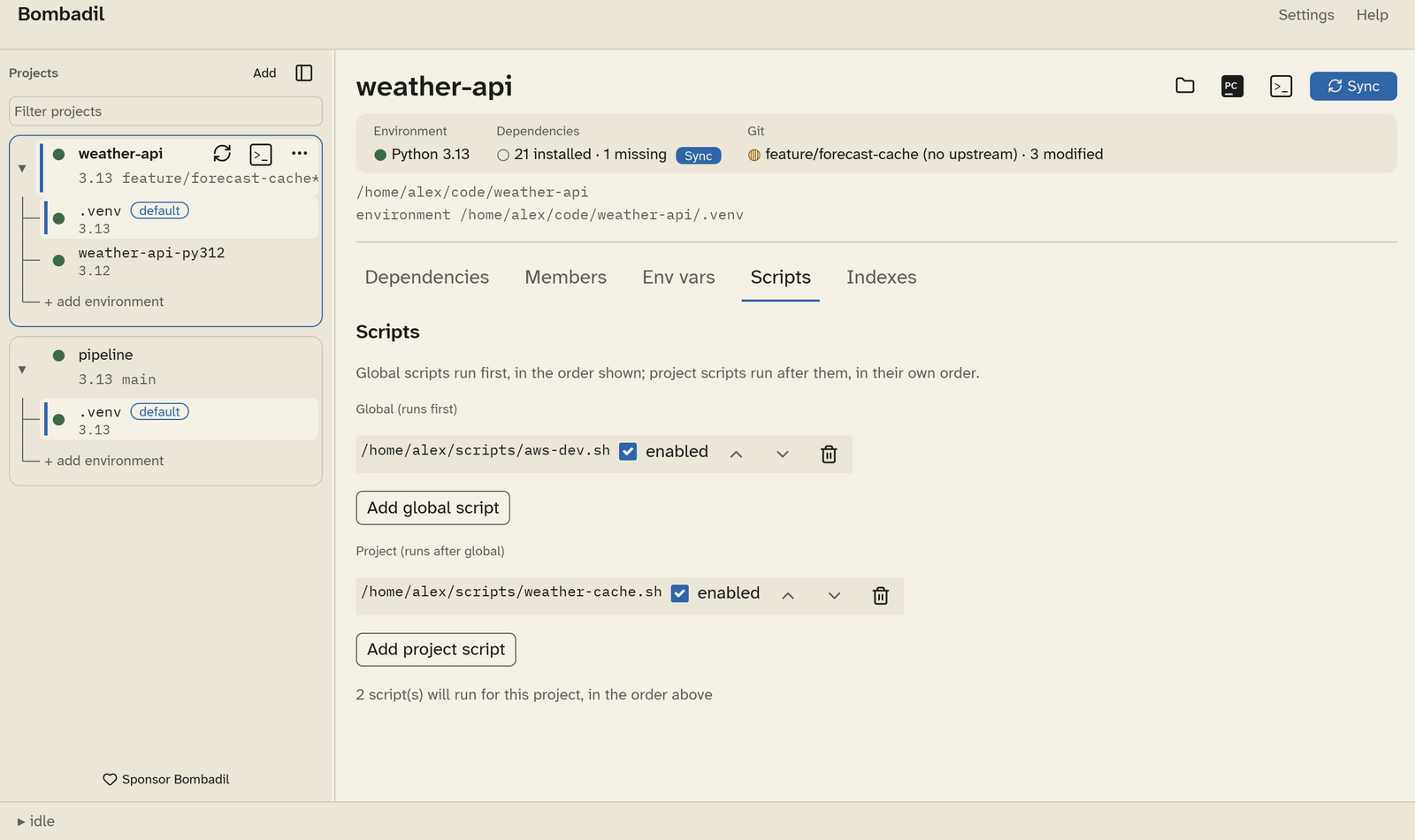
Order
- Global scripts run first, for every project. Manage them in Settings › Scripts.
- Project scripts run after the global ones. Manage them in the project's Scripts tab.
Inside each list, scripts run top to bottom. Use the arrows to reorder them, untick enabled to skip one without removing it, and use the bin icon to remove one. The line at the bottom says how many scripts will run for the project.
Writing a script
- Linux and macOS: the script is sourced by
sh, not by bash or zsh, so write it in POSIX shell. - Windows: the script is dot-sourced by PowerShell, so write a
.ps1file. - Only exported variables reach the environment. What the script prints is discarded.
- If the script exits with an error, the action stops and the error is shown,
with any secret values replaced by
***.
#!/bin/sh
# ~/scripts/aws-dev.sh
export AWS_PROFILE=dev
export AWS_REGION=eu-west-2
Scripts run after your variables and secrets, so they can read them. They run before activation, so they can't change which environment is active. See What a launched process sees.